
For many Boeing 737 sim pilots, the move from mouse clicks to real switches is where the experience finally feels right. The overhead panel is used constantly, yet many options are either expensive or difficult to set up at home.
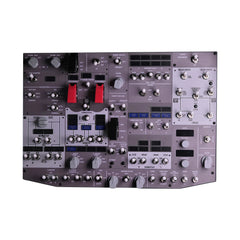
The Rowsfire B107 overhead panel focuses on doing the essentials well. It offers physical switches, clear backlighting, and reliable compatibility with MSFS 2024 and X-Plane 12—without the complexity of a full DIY build.
For sim pilots building a B737 home cockpit, an overhead panel is often the first hardware upgrade that truly changes the experience. With a $100 pre-sale savings, it becomes the perfect next step for a serious home cockpit.
Specifications and Appearance
| Item | Details |
| Product Type | B737 Overhead Flight Sim Control Panel (Standard Edition) |
| Dimensions | 405 × 285 × 60 mm |
| Weight | Approx. 2.8 kg |
| Panel Layout | Boeing 737 overhead layout |
| Front Panel Material | Thick acrylic panel with printed labels and protective film |
| Frame & Housing | Metal frame for rigidity and long-term stability |
| Backlighting | Even LED backlighting for night and low-light flying |
| Switch Types | Toggle switches, momentary switches, spring-loaded switches |
| Mounting Options | Desktop use or rear VESA mounting (100 × 100 mm) |
| Power & Connection | Single USB connection, no external power supply required |
The panel uses a realistic B737-style layout with clearly labeled switches and rotaries for quick recognition during flight. A dark metal frame and uniform backlighting give it a professional cockpit look, ideal for a home flight simulator cockpit or desk-mounted rig.
Important note: The printed panel is shipped with a protective film to help prevent scratches during handling and installation. If you choose to remove the film, gently press the panel while loosening the mounting nuts to avoid scratching the surface.

Key Features and Compatibility
The Rowsfire B107 combines professional-grade materials, smart features, and easy integration to deliver authentic Boeing 737 overhead control. Here are the key highlights in clear, concise points.
Key Features
- Mainboard built with PCB surface-mount technology – stable, reliable, and built to last for years.
- High-performance switches, travel-sensing buttons with tactile feedback.
- Select auto-return switches mimic real jet logic perfectly.
- Single USB cable powers the entire panel – no extra power supply or messy wiring required.
Compatibility at a Glance
- Dual-driver system: Mobiflight + Rowsfire App (Mobiflight works immediately for fast setup).
- For PMDG 737 aircraft – precise control for hardcore MSFS and X-Plane users.
- Runs smoothly on Windows with MSFS 2020, MSFS 2024, and X-Plane 12.
- Future updates will add support for ZiBoMOD, iFly, Laminar Research aircraft, and more – one-time purchase, long-term compatibility.
What’s Included in the Box
The B107 is shipped as a complete Standard Edition overhead panel package. Everything needed for basic installation is included.
- Rowsfire B107 B737 Overhead Panel × 1
- USB data cable × 1
The panel comes in a retail color box for safe transport.
Setup Guide and Troubleshooting
Basic Setup Steps
Setting up the B107 is straightforward and does not require advanced technical skills. Follow these steps.
- Place the panel on a stable desk or mount it using the rear 100 × 100 mm VESA holes.
- Connect the panel to your PC using the included USB cable.
- Start your flight simulator and install Mobiflight if not already installed.
- Load the appropriate aircraft profile (PMDG 737 or supported B737 model).
- Verify switch inputs and backlighting before your first flight.
- Test basic functions: flip the battery switch, start the APU, toggle fuel pumps.
Common Fixes
- Panel not lighting up? Check that the USB port works and try a different cable/port.
- Switches not responding? Make sure Mobiflight is running first—close other sim software, then restart Mobiflight.
- Windows doesn’t detect it? Update USB drivers or try another computer to rule out port issues.
Common Setup Questions and Practical Tips
Here are the most frequent questions simmers ask after unboxing the Rowsfire B107, plus practical tips that go beyond basic setup.
Common Questions
Q1: How bright is the backlighting at night?
A1: The high-power LEDs provide even, soft illumination—bright enough to read labels clearly in a dark room without washing out your monitors. Many users dim their cockpit lights and still see everything perfectly.
Q2: Can I use it with X-Plane 12 right now?
A2: Yes, through Mobiflight. PMDG profiles work best out of the box, but community X-Plane mappings are already shared on forums. Expect smoother native support after the Rowsfire App launches.
Practical Tips
- Angle the panel 15–20° toward you when mounted—it matches real cockpit sight lines and reduces neck strain during long flights.
- Use a powered USB hub if your PC has weak rear ports—some older motherboards deliver inconsistent power to HID devices.
- Join the home flight simulator cockpit Discord or Reddit threads—users share custom Mobiflight tweaks and lighting profiles.

Who This Overhead Panel Is Designed For
This overhead panel is a good fit if you:
Want physical switches instead of on-screen clicks.
Prefer stable, long-term hardware over experimental DIY builds.
Serious home cockpit builders on a realistic budget.
Final Thoughts
The Rowsfire B107 B737 Overhead Panel is designed for sim pilots who value realism, stability, and long-term usability. Its solid construction, clear backlighting, focused B737 layout, and straightforward setup make it a reliable overhead panel that fits serious day-to-day flying.
With the current pre-sale saving $100, the B107 offers added value for pilots already planning a cockpit upgrade. If you’re ready to ditch mouse-clicking and bring real cockpit realism to your home flight simulator cockpit, this is the upgrade you’ve been waiting for.
👉See full specs and current pre-sale pricing for the B107 Overhead Panel at Razordon and decide if it fits your cockpit upgrade plan.