
Wenn Sie ein Flugsimulator-Enthusiast sind, wissen Sie, dass Immersion entscheidend für ein außergewöhnliches Erlebnis ist. Während die Verwendung einer Tastatur und Maus funktionieren mag, ist es nicht dasselbe wie das Fliegen mit echten Bedienelementen.
Hier kommen Flugsimulator-Bedienfelder ins Spiel. Diese Panels bilden die physischen Bedienelemente eines Flugzeugs nach und machen Ihr virtuelles Flugerlebnis realistischer und angenehmer. Dieser Leitfaden erklärt, was diese Panels sind, warum sie Ihr Erlebnis dramatisch verbessern und wie Sie das richtige auswählen, um mit dem Bau Ihres Heim-Cockpits zu beginnen.
Was genau sind Flugsimulator-Bedienfelder?
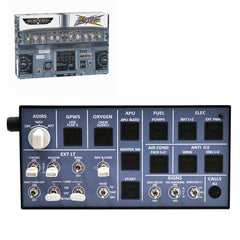
Flugsimulator-Bedienfelder sind spezielle Hardware-Einheiten, die Ihnen physische Tasten, Drehregler und Schalter zur Verfügung stellen, um die Systeme Ihres virtuellen Flugzeugs zu steuern.
Stellen Sie sich sie wie das spezialisierte Lenkrad für Ihren Rennsimulator vor – nur eben für Ihr Cockpit. Sie verwandeln abstrakte Tastaturbefehle oder Mausklicks in greifbare, realistische Interaktionen und ermöglichen es Ihnen, das gesamte Erlebnis des Fliegens eines Flugzeugs zu simulieren.
Wie funktionieren Flugsimulator-Bedienfelder?
Die meisten modernen Flugsimulator-Bedienfelder funktionieren nach dem einfachen Plug-and-Play-Prinzip. Sie verbinden das Gerät über ein USB-Kabel mit Ihrem Computer, und Ihr Simulator (wie MSFS oder X-Plane) erkennt es als einzigartigen Controller.
- Verbindung: Für optimale Ergebnisse stecken Sie Ihr Panel direkt in einen USB-Anschluss des Motherboards, um eine stabile Stromversorgung und Kommunikation zu gewährleisten und ungepowerte Hubs zu vermeiden.
- Kalibrierung: Der Simulator ermöglicht es Ihnen dann, jedes physische Bedienelement – einen Drehknopf, eine Taste oder einen Schalter – einer bestimmten Funktion in der Software zuzuordnen, wie z.B. dem Einstellen der Autopilot-Höhe oder dem Abstimmen eines NAV-Radios.
- Fortgeschrittene Software: Um mehr Anpassungsmöglichkeiten zu erhalten und sicherzustellen, dass Ihre Bedienelemente gut mit komplexen Flugzeug-Add-ons funktionieren, verwenden viele Piloten Software von Drittanbietern wie SPAD.neXt. Diese Software hilft Ihrem Bedienfeld, mit dem Simulator zu kommunizieren und stellt sicher, dass alles reibungslos funktioniert.
Schritt-für-Schritt-Videoanleitung zur Einrichtung eines Flugsimulator-Bedienfelds
Wie können Flugsimulator-Bedienfelder Ihr Flugerlebnis verbessern?
Flugsimulator-Bedienfelder können einen großen Unterschied in der Art und Weise machen, wie Sie die Flugsimulation erleben. Während Tastatur und Maus die grundlegenden Aufgaben erledigen können, fehlt ihnen das taktile Feedback und die Präzision, die Sie von realen Bedienelementen erhalten.
Die Verwendung eines Bedienfelds bietet mehrere Vorteile:
- Erhöhter Realismus: Der offensichtlichste Vorteil ist, dass Sie mit Ihrem Flugsimulator so interagieren können, dass es dem echten Fliegen sehr nahekommt. Sie können Knöpfe drehen, Tasten drücken und Schalter umlegen, genau wie ein echter Pilot, was die Immersion erheblich verbessert und das Erlebnis der Realität näherbringt.
- Schnellere Reaktionszeit: In kritischen Flugphasen, wie Instrumentenanflügen, kommt es auf Geschwindigkeit an. Mit einem dedizierten Funkpanel können Sie Frequenzen sofort einstellen, ohne den Blick von Ihrem primären Flugdisplay abzuwenden.
- Entwicklung entscheidender Muskelgedächtnis: Echte Piloten nutzen Muskelgedächtnis, um Bedienelemente zu bedienen, ohne hinsehen zu müssen. Mit einem Bedienfeld können Sie dieselbe Fähigkeit entwickeln, was zu einem reibungsloseren und intuitiveren Flugerlebnis führt.
Was sind die Haupttypen von Flugsimulator-Bedienfeldern?
Flugsimulator-Bedienfelder gibt es in verschiedenen Typen, die jeweils darauf ausgelegt sind, verschiedene Aspekte realer Flugzeugbedienungen nachzubilden. Für Anfänger ist das Verständnis dieser drei Kerntypen der erste Schritt.
Funk- und Kommunikationspanels
Dies ist die beliebteste erste Anschaffung. Ein dediziertes Funkpanel bietet präzise Drehregler und digitale Anzeigen zur Verwaltung von COM-, NAV- und Transpondercodes, wodurch die Frustration entfällt, winzige virtuelle Drehregler mit einer Maus zu bedienen.
Autopilot- und Avionik-Bedienfelder
Autopilot-Panels ermöglichen es Ihnen, kritische Flugfunktionen wie Höhe, Kurs und Geschwindigkeit zu steuern. Diese Panels enthalten oft Drehregler, Tasten und Anzeigen, die denen in echten Flugzeugen ähneln. Mit einem Avionik-Panel wird die Verwaltung komplexer Verfahren reibungsloser und intuitiver als die Verwendung einer Tastatur.
Schalter-Panels & Fahrwerkshebel
Schaltfelder ermöglichen die Steuerung verschiedener Flugzeugsysteme wie Lichter, Triebwerke und elektrische Energie. Fahrwerkshebel sind ebenfalls häufig auf diesen Feldern enthalten, wodurch Sie den Vorgang des Ein- und Ausfahrens des Fahrwerks während Ihres Fluges simulieren können. Diese Felder sind ein Muss für diejenigen, die das gesamte Cockpit-Erlebnis nachbilden möchten.

Wie richtet man sein Flugsimulator-Bedienfeld ein?
Die Einrichtung Ihres Flugsimulator-Bedienfelds ist in der Regel ein unkomplizierter Vorgang. So fangen Sie an:
- Treiber installieren (falls erforderlich): Einige Premium-Panels benötigen spezifische Treiber, die von der Website des Herstellers heruntergeladen werden müssen. Überprüfen Sie zuerst das Handbuch auf Software- oder Treiberinstallationen.
- Panel anschließen: Verbinden Sie das Bedienfeld über ein USB-Kabel oder Bluetooth mit Ihrem Computer. Stellen Sie sicher, dass Ihre Simulator-Software das Gerät erkennt.
- Bedienelemente kalibrieren: Befolgen Sie die Anweisungen, die mit dem Panel geliefert werden, um die Bedienelemente zu kalibrieren. Dies kann das Zuordnen spezifischer Funktionen zu den Tasten, Schaltern oder Knöpfen auf dem Panel beinhalten.
- Testen und anpassen: Nachdem Ihr Panel eingerichtet ist, führen Sie einige Testflüge durch, um sicherzustellen, dass alles wie erwartet funktioniert. Passen Sie die Einstellungen bei Bedarf an, um eine reibungslose Steuerung zu gewährleisten.
Worauf sollte ich bei meinem ersten Flugsimulator-Bedienfeld achten?
Wenn Sie gerade erst mit Flugsimulator-Bedienfeldern beginnen, gibt es ein paar Dinge zu beachten, um sicherzustellen, dass Sie die beste Einrichtung für Ihre Bedürfnisse erhalten:
Passen Sie es an Ihren virtuellen Hangar an
Stellen Sie sicher, dass das von Ihnen gewählte Bedienfeld mit den Flugzeugtypen kompatibel ist, die Sie in Ihrem Simulator fliegen möchten. Einige Panels sind für bestimmte Flugzeuge (z. B. einmotorige Flugzeuge, Verkehrsflugzeuge oder Helikopter) konzipiert, während andere vielseitiger sind.
Legen Sie ein realistisches Budget fest
Flugsimulator-Bedienfelder reichen von preisgünstigen Optionen unter 200 US-Dollar bis zu High-End-Systemen, die über 1.000 US-Dollar kosten können. Als Anfänger ist es am besten, mit einem Basispanel zu beginnen, das wesentliche Funktionen wie Schub- und Funksteuerung bietet, und dann aufzurüsten, wenn Sie mehr Erfahrung sammeln.
Überspringen Sie niemals Kompatibilitätstests
Bevor Sie ein Panel kaufen, überprüfen Sie nochmals, ob es mit Ihrer Flugsimulationssoftware (z. B. MSFS, X-Plane oder Prepar3D) kompatibel ist. Einige Panels funktionieren mit mehreren Simulatoren, während andere für spezifische Software entwickelt wurden. Die Sicherstellung der Kompatibilität erspart Ihnen später Zeit und Frustration.
Fazit
Die Investition in ein Flugsimulator-Bedienfeld ist die effektivste Methode, Ihr Erlebnis von einem Computerspiel in eine authentische Simulation zu verwandeln. Es löst das Kernproblem der immersionsstörenden Mausklicks und ersetzt sie durch intuitive, taktile Steuerung. Beginnen Sie mit einem Panel, das Ihren größten Bedarf deckt, und bauen Sie von dort aus Ihre ultimative Einrichtung auf.
Bereit, Ihr virtuelles Fliegen zu verändern? Stöbern Sie in unserer kuratierten Kollektion anfängerfreundlicher Flugsimulator-Bedienfelder bei Razordon, wo Qualität auf Erschwinglichkeit trifft.